 Ir al contenido
Quick Answer: Should an IP Security Camera Use Main Stream or Sub Stream?
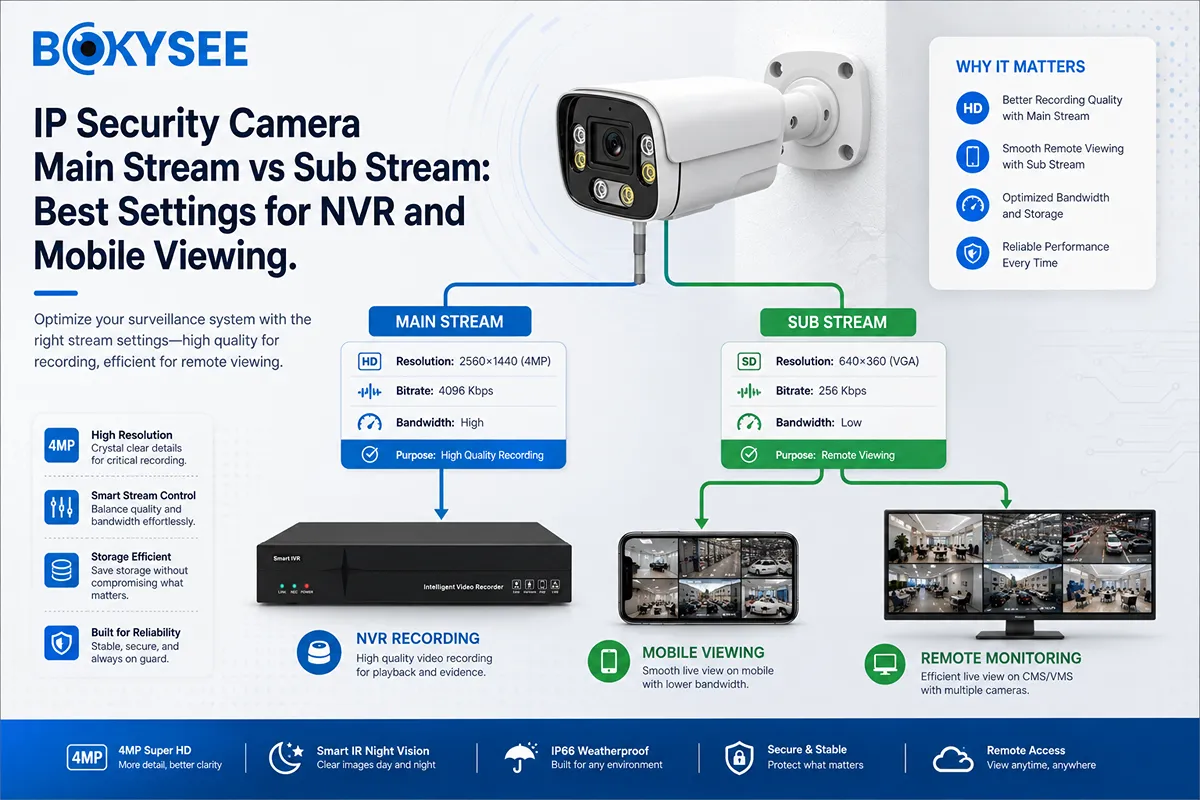
Use the main stream for NVR recording and detailed playback. Use the sub stream for multi-camera display, mobile monitoring and slower internet connections. The main stream protects evidence quality, while the sub stream reduces bandwidth and decoding load.
The best settings depend on resolution, H.264 or H.265, FPS, scene movement, upload speed and NVR decoding capacity. Buyers can compare the Bokysee IP security camera range and review the IP security camera encoding settings guide before sample testing.
What Is the Main Stream on an IP Security Camera?
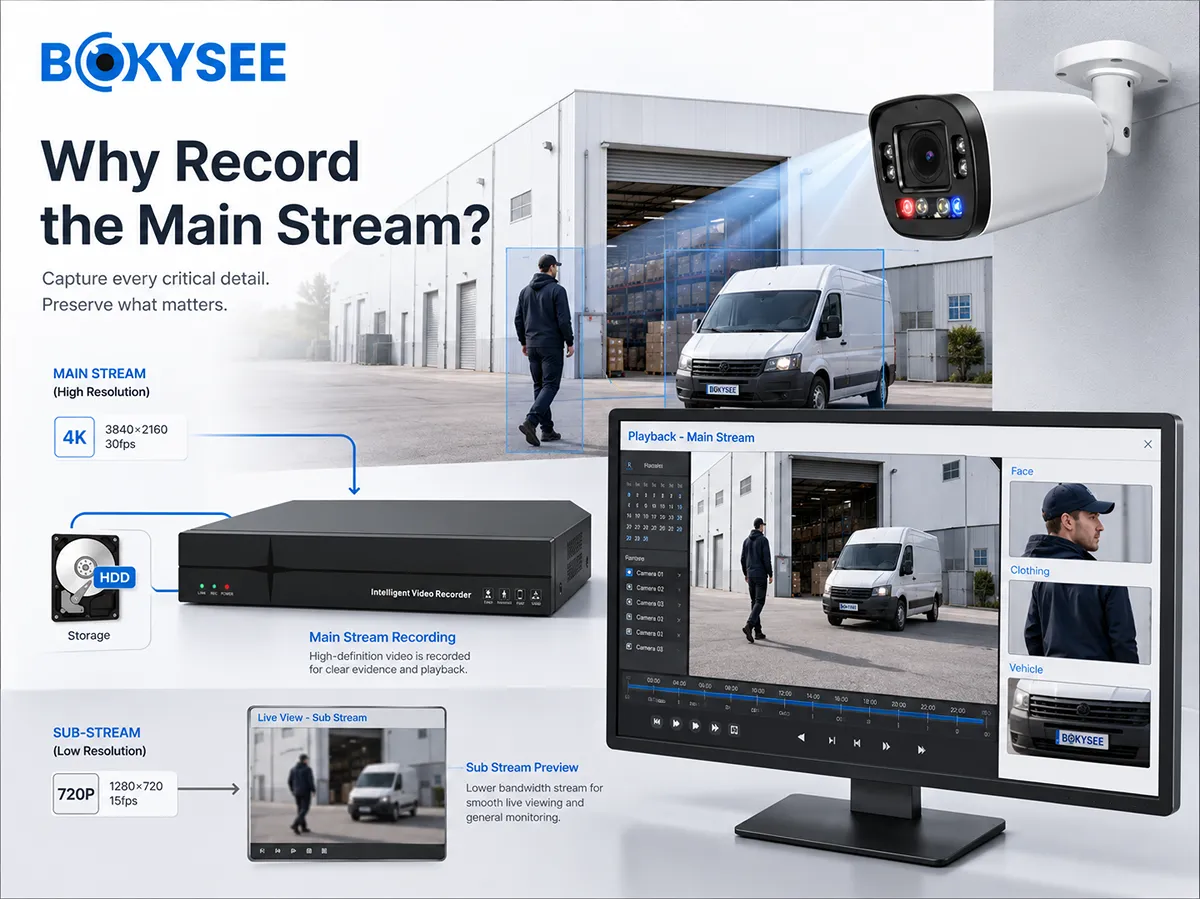
The main stream is the camera’s primary, higher-quality video stream. It normally uses the required project resolution, a higher bitrate and a frame rate suitable for the monitored activity.
It is used for continuous or event recording, detailed playback, facial or clothing detail, vehicle identification, cashier evidence, digital zoom and high-quality export.
An 8MP camera may output an 8MP main stream, but bitrate and FPS should match the scene. A quiet warehouse aisle needs less data than a vehicle entrance. Too little bitrate produces blockiness and lost motion detail; too much wastes bandwidth and storage.
The main stream is not ideal for every viewing task. Sending sixteen high-resolution main streams to a phone can cause delay even when local recording is stable.
What Is the Sub Stream on an IP Security Camera?
The sub stream is a second, lower-bandwidth stream from the same camera. It normally uses lower resolution, bitrate and FPS.
It supports mobile live view, browser preview, large NVR split screens and remote monitoring over limited upload bandwidth. It should show the scene clearly but is not normally the preferred evidence stream.
Correct sub-stream configuration often fixes the complaint: “The recording is clear, but phone viewing is slow.” The NVR may be recording correctly while the remote client requests more data than the connection or phone can handle.
IP Security Camera Main Stream vs Sub Stream Comparison Table
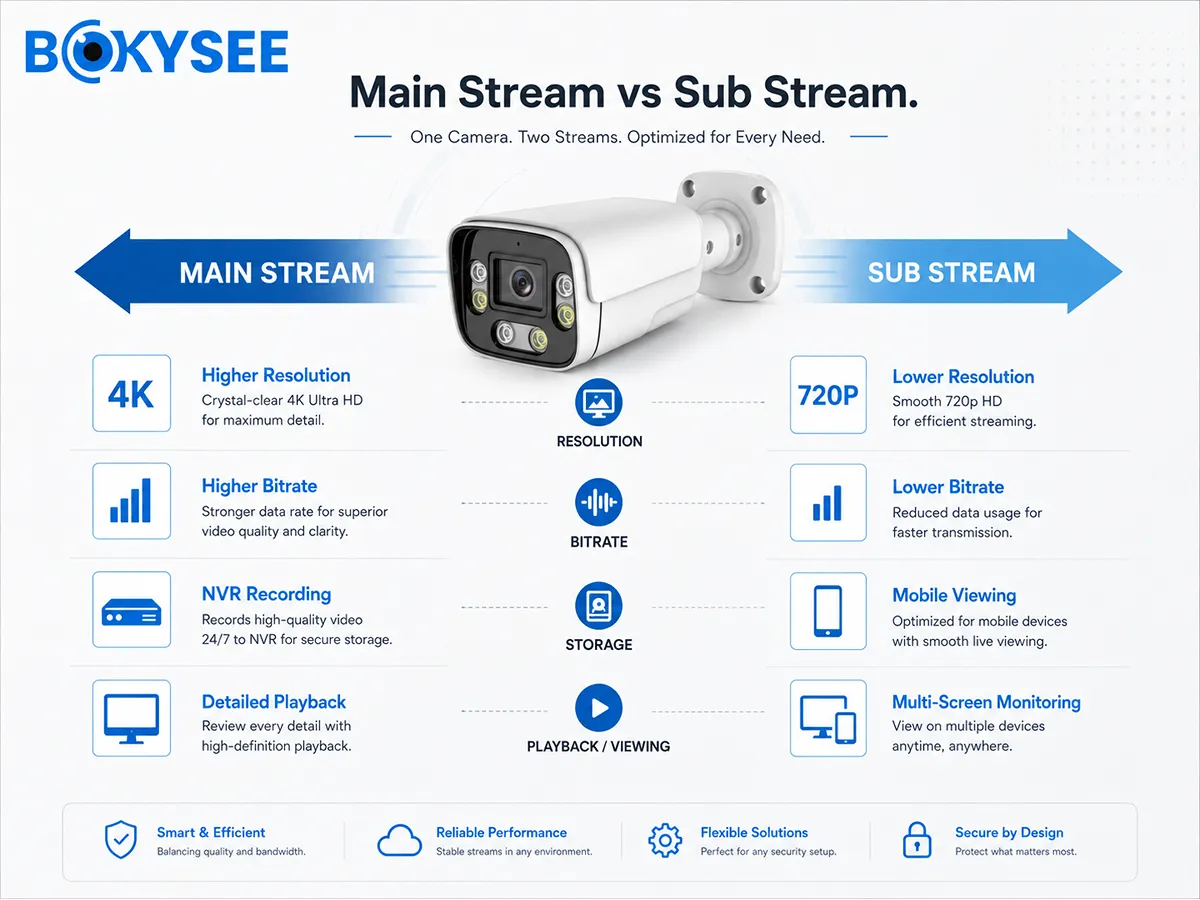
| Setting | Main Stream | Sub Stream | Uso recomendado |
| Resolución | Higher | Lower | Main for evidence, sub for overview |
| Tasa de bits | Higher | Lower | Balance quality against capacity |
| Velocidad de cuadros | Full project requirement | Often reduced | Maintain usable motion in live view |
| Storage demand | Higher | Lower | Main stream normally determines HDD size |
| Mobile data use | Higher | Lower | Sub stream is usually preferred remotely |
| NVR decoding load | Higher | Lower | Use sub streams in large split screens |
| Digital zoom detail | Better | Limitado | Do not rely on sub stream for identification |
| Typical role | Recording and playback | Preview and remote view | Configure both streams |
The streams are not competing choices. Recording only a low-resolution sub stream may save storage but weaken evidence. Removing the sub stream may overload multi-camera displays.
Best Main Stream Settings for IP Security Camera Recording
There is no universal bitrate. The following H.265 ranges are practical starting points and should be tested in the real scene, especially at night.
| Resolución de la cámara | Starting Bitrate Range | Typical FPS Range | Common Use |
| 2MP | 1.5-3 Mbps | 12-25 fps | Homes, offices and general monitoring |
| 4MP | 2-4 Mbps | 12-25 fps | Retail, warehouses and entrances |
| 5MP | 3-5 Mbps | 12-25 fps | Commercial projects and wider detail |
| 8MP | 4-8 Mbps | 12-25 fps | Parking, entrances and premium systems |
Set resolution and FPS for the actual scene, define a maximum bitrate for network calculation and test night playback. Trees, rain, vehicles and image noise can require more data than a static indoor scene.
For most projects:
1. Select the resolution needed for identification, not automatically the maximum.
2. Set FPS according to movement.
3. Use VBR where scene complexity changes and the NVR supports it.
4. Set a maximum bitrate for storage and bandwidth planning.
5. Test moving targets at night.
6. Check recorded playback and exported files.
El Bokysee security camera frame-rate guide explains 15 fps, 25 fps and 30 fps applications.
Best Sub Stream Settings for IP Camera Mobile Viewing
A useful sub stream should load quickly without becoming unreadable.
| Application | Example Resolution | Example Bitrate | Example FPS |
| One to four cameras on Wi-Fi | 640 × 360 to 704 × 576 | 384-768 Kbps | 10-15 fps |
| Eight to sixteen cameras on mobile | 640 × 360 or similar | 256-512 Kbps | 8-12 fps |
| Remote site with limited 4G upload | 320 × 240 to 640 × 360 | 128-384 Kbps | 5-10 fps |
| Local NVR multi-screen | 640 × 360 to 704 × 576 | 384-768 Kbps | 10-15 fps |
The client must support the codec. A phone or browser may perform better with H.264 sub streams even when the NVR records H.265 main streams. Test the combination because mixed codecs use additional camera resources.
Do not set the sub stream unnecessarily high. Sixteen sub streams at 1 Mbps require roughly 16 Mbps before overhead, which may exceed site upload speed or NVR outgoing bandwidth.
Why an NVR Uses Sub Streams in 9-, 16- or 32-Channel Live View
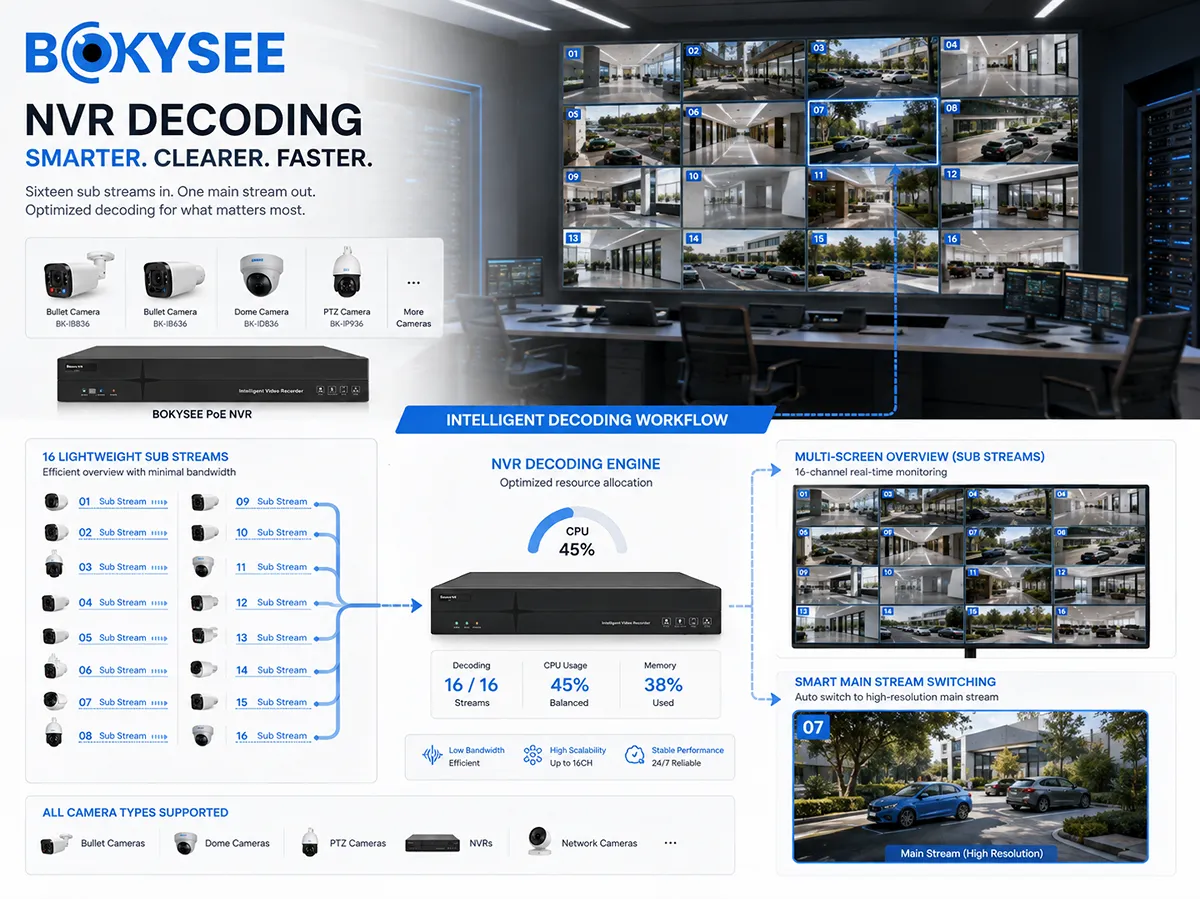
Typical behavior is:
· One-camera full screen: main stream
· Four-camera split: main or mixed streams
· Nine-camera split: mostly sub streams
· Sixteen- or thirty-two-camera split: sub streams
· Playback of a selected channel: main stream
This does not mean the NVR records low-quality footage. The recording can remain on the main stream while the screen shows a sub stream.
A “resource insufficient” warning may appear when too many high-resolution streams are forced onto the display. Use sub streams for split view and review the NVR decoding specification.
Why IP Camera Remote Viewing Is Slow or Keeps Buffering
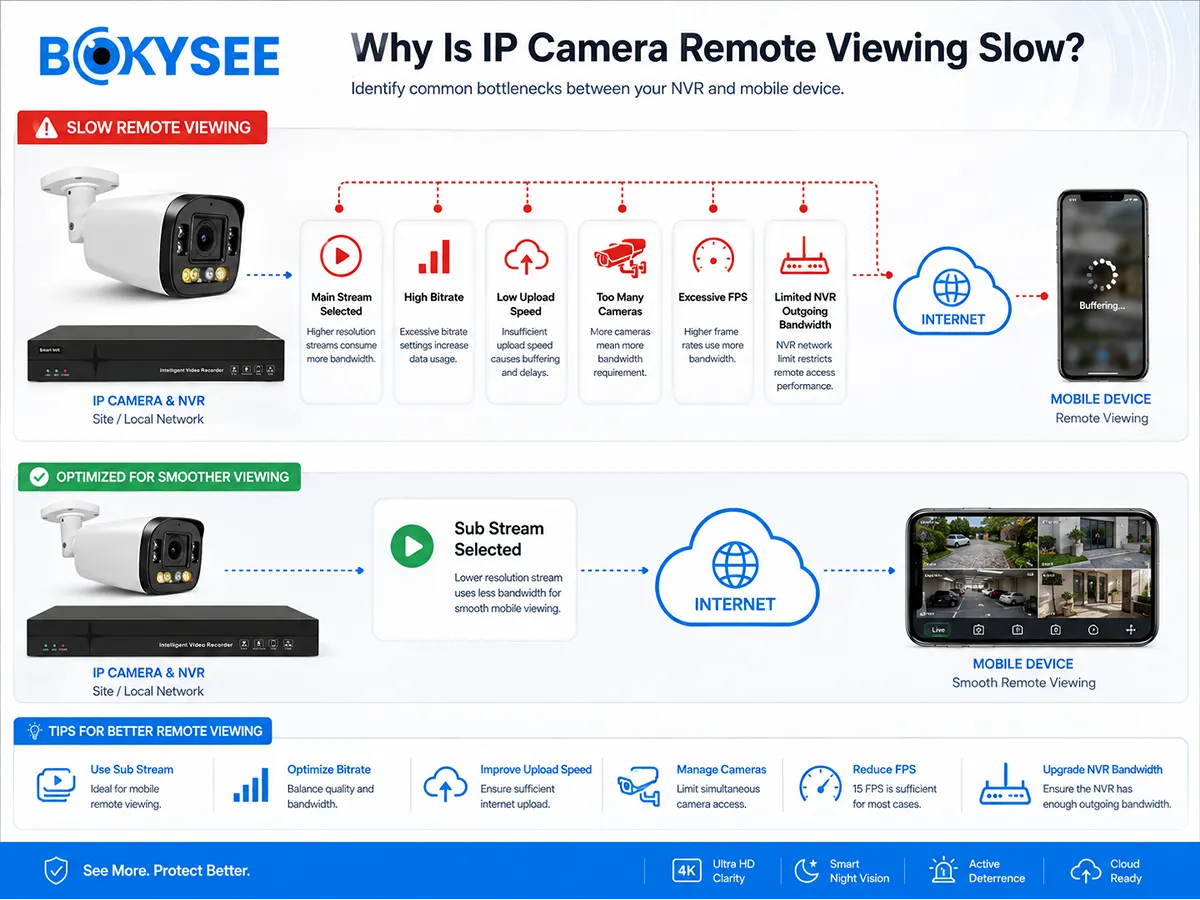
Remote performance depends on upload speed at the camera or NVR site, NVR outgoing bandwidth and client decoding. Delay commonly occurs when:
· The app requests the main stream
· Too many cameras are opened
· Sub-stream bitrate is too high
· Site upload speed is limited
· The phone cannot decode the codec smoothly
· Mobile signal or P2P routing is unstable
· Night noise increases VBR bitrate
· Camera and NVR stream settings do not match
Use this calculation:
Required remote upload ≈ number of viewed streams × bitrate per stream
Four 512 Kbps sub streams need about 2 Mbps before overhead. Four 6 Mbps main streams need about 24 Mbps. This explains why one-camera view works while four-camera main-stream view buffers.
For cellular projects, see the Bokysee 4G camera data usage guide.
Main Stream and Sub Stream Settings by IP Security Camera Application
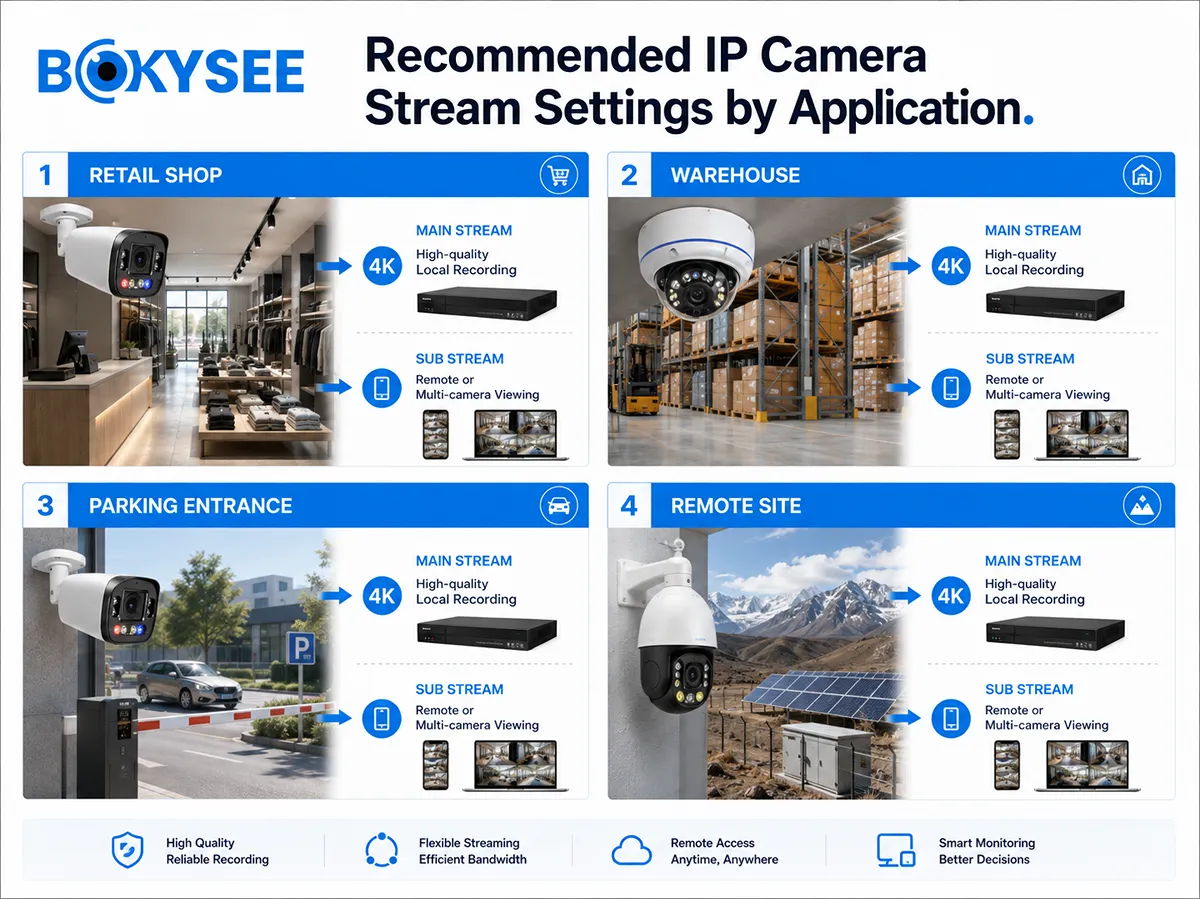
| Application | Main Stream Priority | Sub Stream Priority |
| Retail store | Face, cashier and entrance detail | Smooth four- or eight-camera mobile view |
| Depósito | Door, aisle and loading-zone evidence | Efficient many-channel monitoring |
| Parking entrance | Motion detail, exposure and identification | Status monitoring only |
| Remote construction site | Local high-quality recording | Low-bitrate 4G live view |
| Distributor showroom | Demonstrate recording quality | Demonstrate responsive remote access |
For license plates or moving vehicles, do not rely on the sub stream as the only evidence source. For remote sites, retain the main stream locally and use event alerts plus a lower-bitrate sub stream to control data use.
How H.264 and H.265 Affect IP Camera Main and Sub Streams
H.265 is designed for more efficient video compression. The official ITU-T H.265 recommendation is the standards reference. In CCTV, H.265 can reduce bandwidth and storage for a comparable quality target, but results depend on the encoder, scene and settings.
A practical configuration may use H.265 for the main recording stream and H.264 for the sub stream to improve client compatibility. Another project may use H.265 on both. The camera, NVR, mobile app, browser and VMS must all support the selected combination.
ONVIF Profile T supports H.264 and H.265 streaming. Review the official ONVIF Profile T page when preparing interoperability requirements.
How RTSP and ONVIF Select IP Security Camera Streams
RTSP is commonly used to retrieve video streams; the official RFC 7826 RTSP 2.0 specification is the protocol reference. Manufacturers may provide different paths for main and sub streams. ONVIF can expose media profiles, but the client still needs a compatible codec and resolution.
If only one stream appears on a third-party NVR, verify that the sub stream is enabled, both media profiles are exposed, the ONVIF user has permission and the codec is supported. An RTSP picture does not prove that ONVIF events, audio or PTZ functions work.
Main Stream and Sub Stream Compatibility Checklist for Bulk Orders
| Test Item | Acceptance Requirement |
| Main-stream recording | Correct resolution, codec, FPS and stable recording |
| Sub-stream live view | Smooth multi-screen and mobile viewing |
| Stream switching | Correct switch between split view and full screen |
| Reproducción | Main-stream detail remains clear |
| Audio | Synchronized on required stream and client |
| ONVIF profiles | Both required streams visible to target NVR |
| RTSP | Main and sub URLs work where required |
| Remote bandwidth | Stable under expected upload conditions |
| Reconnection | Streams recover after cable or power interruption |
| Night test | Bitrate and image remain acceptable after lights activate |
A representative 5MP PoE IP security camera can be tested with the target NVR before bulk production.
IP Security Camera Main Stream vs Sub Stream FAQ
Does the sub stream reduce main-stream recording quality?
Normally no. They are separate configurations, although both use camera processing resources.
Can an NVR record the sub stream?
Some NVRs can, but the main stream is normally preferred when identification detail matters.
Why is mobile live view blurry while NVR playback is clear?
The app is probably displaying the lower-resolution sub stream while the NVR records the main stream.
Should both streams use the same codec?
Not necessarily. H.265 may be used for recording and H.264 for client compatibility.
Can lowering sub-stream bitrate fix mobile lag?
It can help, but upload speed, outgoing NVR bandwidth, client decoding and latency should also be checked.
Final Recommendation: Configure Both IP Security Camera Streams for Their Correct Jobs
Record the main stream at the quality required for evidence. Use the sub stream to make multi-camera display and remote viewing efficient. Test both streams with the actual NVR, app and internet conditions.
Bokysee supports stream configuration and compatibility testing. Share resolution, camera quantity, NVR model, recording days and remote network conditions to receive a suitable IP security camera and NVR solution.






 Spanish
  English
  Russian