Deploying a cellular solar security camera without a strict data and power management strategy leads to runaway operational costs. Misconfigured video streams and inefficient modem behavior can turn a fixed-cost security asset into an unpredictable monthly expense, destroying project profitability with data overages and frequent site visits.
This analysis defines the operational rules for balancing performance and cost. We evaluate the data impact of main-stream versus sub-stream resolution and the battery savings from modem sleep schedules. The focus is on the technical settings—from codec choice to antenna placement—required to keep data usage predictable without sacrificing alert reliability.
Multi-Band 4G LTE/5G Network Tuning
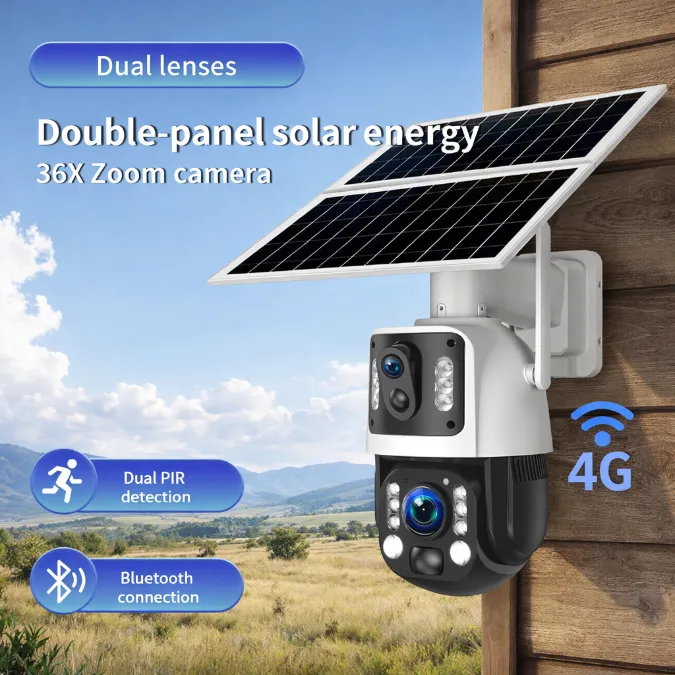
Cellular radios drain batteries fast. Smart network tuning—from antenna choice to firmware logic—is essential to keep solar-powered cameras online without needing massive solar panels.
The Power-Performance Trade-Off in Cellular Connectivity
A 4G or 5G radio is one of the biggest power consumers in a solar camera system. These cellular modems often use two to four times more energy than a standard Wi-Fi radio, which directly forces the use of larger solar panels and bigger batteries to keep the system running. Ignoring this power draw is a recipe for failure.
When a camera has poor signal or chooses an inefficient cellular band, the modem cranks up its transmit power just to stay connected. This constant high-power state drains the battery much faster than anticipated. During periods of low sun, like a string of cloudy days, this increased energy drain can easily lead to a complete system shutdown, leaving the site unprotected.
Hardware and Software Strategies for Network Optimization
Getting the hardware right from the start is non-negotiable. This means selecting modems that support a wide range of cellular bands and pairing them with wideband antennas. The system needs access to low-frequency bands (like 700-900 MHz) for better range and penetration through obstacles, and high-frequency bands for faster data speeds when necessary.
The firmware’s logic is what ties it all together. It actively manages the cellular connection to save power. Smart firmware will prioritize power-efficient bands, limit how often the modem performs power-hungry network scans, and adapt video bitrates on the fly. This adaptation isn’t just based on signal strength; it also accounts for the battery’s state of charge, ensuring the camera stays online for critical alerts even when power is low.
Data Consumption and Monthly Cost Control
Monthly cellular data costs depend less on the camera hardware and more on configuration. Your biggest levers are using motion-triggered recording and disciplined live-view habits.
For any off-grid deployment, data is the primary recurring operational expense. Getting it wrong doesn’t just lead to overage fees; it can make a project economically unviable. The monthly data burn for a single 4G camera can range from under 2 GB to over 45 GB, and the difference almost always comes down to setup and usage policies, not the camera itself.
| Key Factors Determining Data Usage | Practical Methods for Cost Reduction |
|---|---|
Key Factors Determining Data Usage
|
Practical Methods for Cost Reduction
|
Build Your Security Business With Us.
Sub-Stream vs Main-Stream Resolution Balance
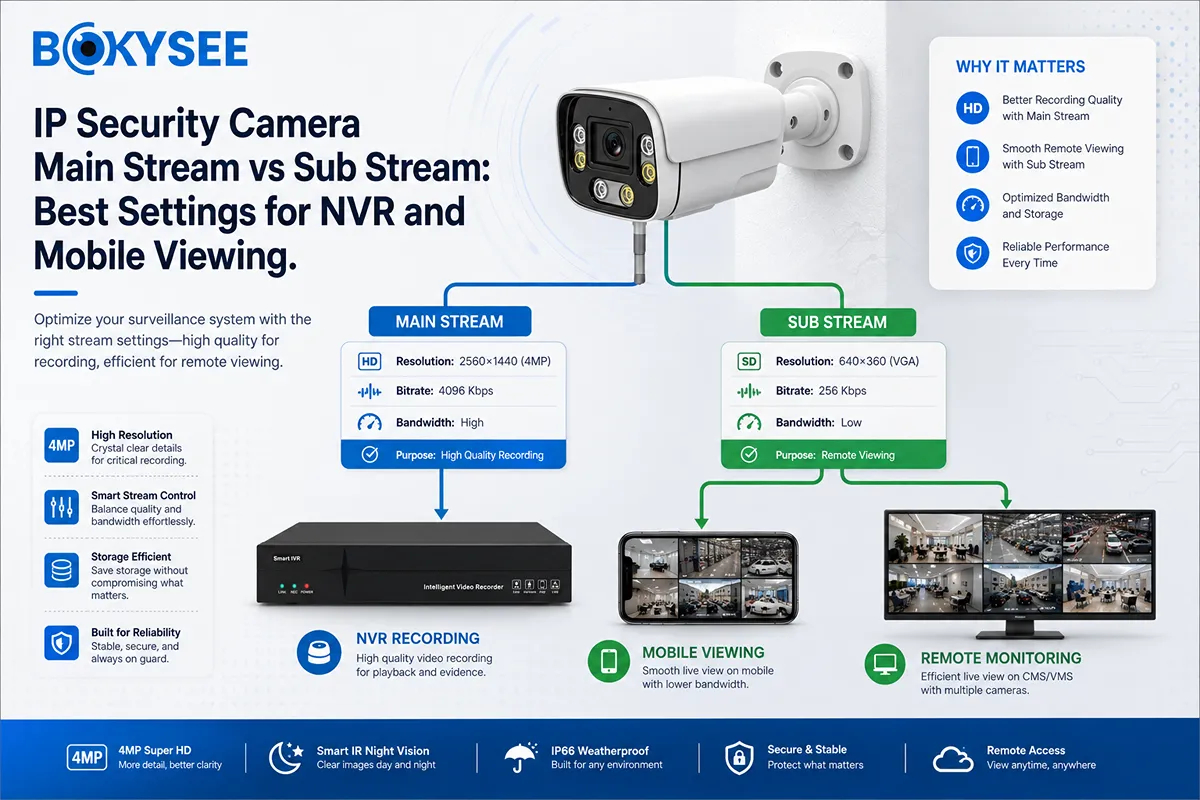
Main-stream captures high-quality evidence. The sub-stream delivers a smooth live view over cellular. Getting this balance right is non-negotiable for remote deployments.
Defining the Roles: High-Quality Recording vs. Smooth Live View
The dual-stream design isn’t a “nice to have,” it’s the core of how a remote camera functions properly. Each stream has a specific job, and confusing their roles leads to failed connections and useless footage.
- Main-Stream: This is your evidence-grade feed. It captures video at high resolutions like 1080p or 4MP, intended for recording directly to local storage (like an SD card). It’s built for quality, ensuring you have clear details for a forensic review. It is not designed for streaming over a weak cellular link.
- Sub-Stream: This is your live-view workhorse. It provides a lower-resolution feed (think VGA or CIF) specifically engineered for a smooth, low-lag experience on a phone or over a constrained network. Its only job is to give you reliable situational awareness right now.
This setup allows the camera to record crisp, usable evidence without sacrificing your ability to check in remotely and see what’s happening in real-time.
Optimal Settings for Cellular and Solar Deployments
For any camera relying on a cellular connection, prioritizing remote access is the only logical starting point. Always configure the sub-stream first. Keep lowering its resolution and bitrate until your live feed is fluid and stable over the cellular connection at the deployment site.
At the same time, keep the main-stream set to a high resolution. This is your insurance policy. It ensures the footage recorded on the device’s SD card is actually useful for identifying people, vehicles, or specific actions after an event.
This balance is critical because cellular uplink speeds are often slow and unpredictable. Trying to stream the main-stream will almost always fail, leading to frustration and a black screen. A properly configured sub-stream guarantees reliable access and also helps conserve precious battery life in a solar-powered system by reducing the modem’s workload.
Power-Saving Modem Sleep Schedule Matrix
A modem sleep schedule is a rule-based system that balances battery preservation with alert responsiveness, telling the modem when to sleep, wake, and transmit based on real-world conditions.
Balancing Energy Savings and Alert Reliability
The main job of a sleep schedule is to cut the standby power drain from the cellular modem, which is one of the biggest energy hogs in any off-grid camera system. The schedule must be smart enough to let the modem wake up almost instantly for critical security events. If someone triggers motion detection or you request a live view, it has to respond.
This creates a fundamental trade-off. The longer the modem sleeps, the more battery you save. But this also increases the time it takes to send an alert. These schedules aren’t static; they adapt to the environment. During winter or long stretches of cloudy weather with poor solar charging, the system will use more aggressive sleep profiles to conserve every drop of power.
Key Parameters and Common Operational States
The logic that drives these schedules is built on a few key dimensions: time of day, current battery level, the type of event that occurred, and the quality of the network signal. Based on these inputs, modems cycle through a few operational states.
- Active: Used for immediate data transfers, like uploading a video clip.
- Deep Sleep: The state for maximum power savings, where most modem functions are powered down.
- Scheduled Wake: Waking up at predetermined intervals for routine tasks like sending a health check signal.
Event-driven wakeups are standard practice. The modem stays in a low-power state until an event, like motion, triggers the need to transmit data. Engineers fine-tune practical parameters like heartbeat intervals, the specific battery voltage that forces a deep sleep, and the backoff timing for retrying a failed network connection.
High-Gain Antenna Mounting Mechanics
Properly mounting a high-gain antenna is non-negotiable for a stable cellular link. Height, a clear line-of-sight to the tower, and rigid hardware directly impact signal quality.
Structural Mounting Hardware and Stability
The hardware you use to mount a high-gain antenna is just as important as the antenna itself. Standard solutions involve steel or aluminum poles secured with U-bolts or saddle clamps. For building installations, L-brackets bolted to exterior walls are common. In the field, some installers even use rigid 1″ gas pipe as a mast anchored to a post or tree.
The mount must be adjustable. Look for designs that allow for both azimuth (rotation) and elevation (tilt) changes to precisely aim the antenna. Stability is critical, especially with narrow-beam directional antennas. Any movement from wind can kill the signal. Good mounts feature locking mechanisms like serrated washers or set screws to prevent drift. You should always use rigid masts that won’t sway, and secure fasteners with locking nuts or thread-locking compounds to stop them from loosening over time.
For long-term outdoor use, material choice matters. Galvanized steel, anodized aluminum, and UV-stable plastics hold up best against the elements. If you’re installing in a coastal area, using stainless hardware and avoiding contact between dissimilar metals will prevent corrosion and ensure the mount remains structurally sound.
Positioning, Aiming, and Cable Management
Where you place the antenna dictates its performance. The rule is simple: get it as high as practical, with the clearest possible line-of-sight to the cell tower. Avoid trees, building walls, and large metal objects like fences or containers in the antenna’s path. Even foliage can significantly weaken the signal. If mounting near a tree or wall, use a stand-off bracket to keep the antenna at least one or two feet away from the surface.
Aiming a directional antenna is a hands-on process. First, use a cell tower locator app to find the approximate direction of the nearest tower. Mount the antenna loosely in that general direction. Then, put the camera in its diagnostic or setup mode to see the live signal strength (RSRP or RSSI). Perform a slow 360-degree sweep, rotating the antenna in small 10-degree increments. Wait at least 30 to 60 seconds after each adjustment for the camera to provide an accurate reading. Once you find the direction with the strongest signal, make very small fine-tuning adjustments to max it out, then tighten all the hardware securely.
Proper cable management prevents damage and signal loss. Always use weather-rated coaxial cable. When routing the cable, form a “drip loop” just before the connector. This simple bend ensures rainwater runs down and drips off the cable instead of flowing into the connector. Secure the cable to the pole or mast with UV-resistant zip ties to prevent wind from whipping it around, which can stress the connector and eventually cause failure. Finally, never kink the coax cable; respect its minimum bend radius to protect its internal structure.
SIM Tray Weatherproof Ingress Seals
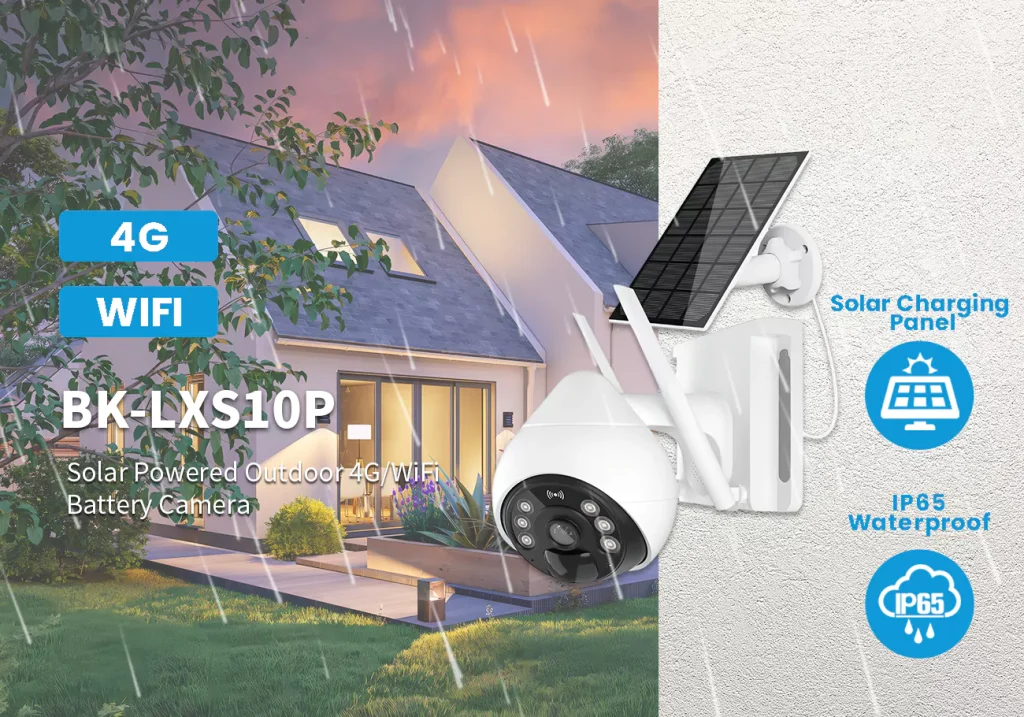
A small rubber gasket on the SIM tray creates a compression seal to block rain and dust. It’s a critical, but often overlooked, component of a camera’s outdoor durability.
Function and Sealing Mechanism
A small rubber gasket or O-ring is built into the SIM tray. When you push the tray completely into the camera, this gasket compresses against the housing to form a tight seal. Its only job is to stop the SIM opening from being a direct path for rain, dust, and humidity to get inside the camera.
This seal helps maintain the enclosure’s internal pressure barrier, which is essential for any electronic device meant to live outdoors. This single component is just one part of the camera’s total weatherproofing, which also depends on adhesives for the display, gaskets for ports, and seals where the frame pieces meet.
Design Considerations for Outdoor Durability
The seal material must stay elastic and effective even after someone has opened and closed the tray many times. It has to withstand field vibrations, UV exposure from the sun, and constant temperature swings. The most common failures occur when the gasket wears out, gets contaminated with debris, is misaligned, or when the tray isn’t inserted all the way, compromising the entire camera body.
Camera designs have to balance the need for a tight seal against the practical need for user access. The seal must be strong enough for weather resistance but not so tight that a technician can’t service the SIM card in the field. Any time the SIM card is accessed, especially on a camera that’s been out in rough weather, that tray seal should be inspected for damage or debris.
Over-The-Air Remote Firmware Runs
For off-grid cameras, remote firmware updates aren’t a convenience. They’re a necessity for reducing truck rolls, but they introduce unique risks with power, connectivity, and data management.
Core Challenges in Off-Grid Deployments
Pushing firmware to a solar-powered camera miles from anywhere is not like updating a smartphone. The process is fragile and has to account for an environment where power and connectivity are never guaranteed. Get it wrong, and you’ve just created a very expensive paperweight that requires a site visit to fix.
- Power Consumption: The download and installation process draws significant power. An update must be smart enough to wait for strong sunlight and a healthy battery state-of-charge, or it risks draining the battery mid-install.
- Unstable Connectivity: Remote sites often have marginal cellular signals. An interrupted download can lead to a corrupt file and a failed update, forcing multiple retries that burn both battery and data.
- Data Plan Impact: Firmware files aren’t small. Pushing a multi-megabyte update across a fleet of cameras can have a real impact on monthly data plans, so efficient, compressed delivery is critical.
Key Features for Dependable Remote Updates
A professional-grade remote update system isn’t just about pushing a file. It needs built-in safeguards that understand the constraints of an off-grid device. These features separate reliable platforms from those that create operational headaches.
- Power-Aware Scheduling: The system should automatically check battery levels and solar input. If conditions aren’t right, it holds the update until the device is in a healthy power state. This is a non-negotiable feature.
- Automatic Rollback: If a new firmware version fails to boot correctly or causes critical errors, the device must be able to automatically revert to the last known good version. This is the safety net that prevents bricking.
- Clear Status Reporting: The management app or cloud portal needs to provide real-time feedback. Operators must see the status of downloads, installations, and any failures, so they can track progress without guessing.
Frequently Asked Questions
How much cellular data does a commercial solar security camera use?
Data consumption varies based on video settings, motion activity, and remote viewing. Typical use ranges from 0.4–2 GB per month for light activity to 3–9 GB for moderate commercial sites. Continuous high-resolution recording is impractical, potentially using 300–600 GB monthly. For most motion-activated deployments at construction sites or remote gates, planning for 2–10 GB per camera each month is a solid baseline.
Do cellular security cameras need a static IP for remote viewing?
No, most modern cellular solar cameras do not need a static IP. They use cloud-based P2P services to connect. The camera establishes a connection to the manufacturer’s server, and you access the feed through an app that also connects to that server. This design works with the dynamic IP addresses assigned by cellular carriers and avoids any complex network setup like port forwarding.
Which cellular bands offer the best reliability for remote cameras?
Low-band spectrum, such as 600 MHz, 700 MHz, and 850 MHz bands, provides the most reliable connection for remote camera uploads. These lower frequencies travel farther and penetrate obstacles like trees and buildings more effectively. For sending alerts and video clips from rural or obstructed locations, a strong signal on these bands is more important than the higher speeds of mid-band or high-band frequencies.
Can multiple people watch a 4G solar camera’s live feed at the same time?
Yes, 4G solar cameras generally support multiple simultaneous live viewers. Most systems send one video stream to a cloud platform, which then distributes it to anyone logged in to watch. This limits the strain on the camera’s cellular connection. The practical number of viewers depends on the camera’s uplink speed and the service platform. Keep in mind that sustained multi-viewer streaming will increase both data usage and power drain on the battery.
What kind of SIM card holds up best in extreme outdoor temperatures?
An MFF2 embedded SIM, sometimes called an eSIM in IoT devices, is the best choice for extreme outdoor conditions. Because it is soldered directly onto the camera’s main board, it withstands vibration, moisture, and wide temperature swings far better than a removable plastic SIM card. Industrial-grade embedded SIMs are typically rated to operate reliably from -40°C to +105°C.
How does the cellular modem save power when the camera is in standby?
To conserve the battery, the camera almost completely shuts down the cellular modem during standby periods. When no motion is detected, the camera’s main controller powers off the modem’s dedicated circuit. Only an ultra-low-power motion sensor and microcontroller remain active. Once motion is detected, the controller quickly powers the modem back on to reconnect to the network and transmit alerts or video.
Final Thoughts
Successful remote deployment isn’t about the camera; it’s about operational discipline. The technical standards outlined here—from modem sleep schedules to antenna mounting—are your only defense against dead batteries and crippling data overages. Ignoring these rules trades a small upfront saving for guaranteed project failure and a damaged reputation.
Stop guessing which hardware and data plans will survive in the field. Our team helps dealers and wholesalers build deployment blueprints for specific operational needs, from high-traffic construction sites to remote infrastructure. Contact us to review your project specs or discuss OEM configurations that enforce these reliability standards from the start.