
Quick Summary
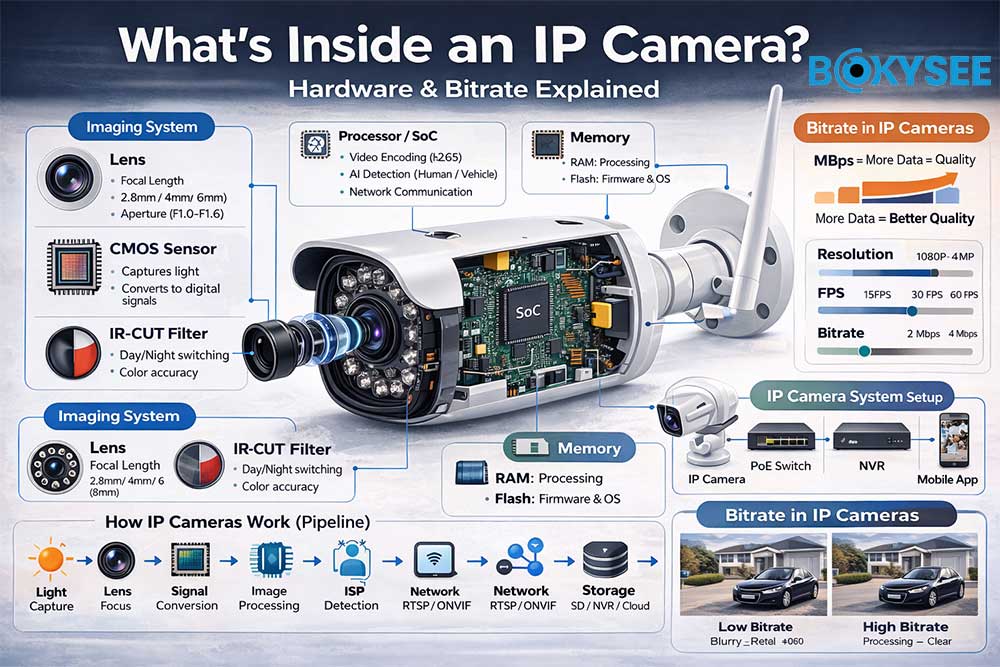
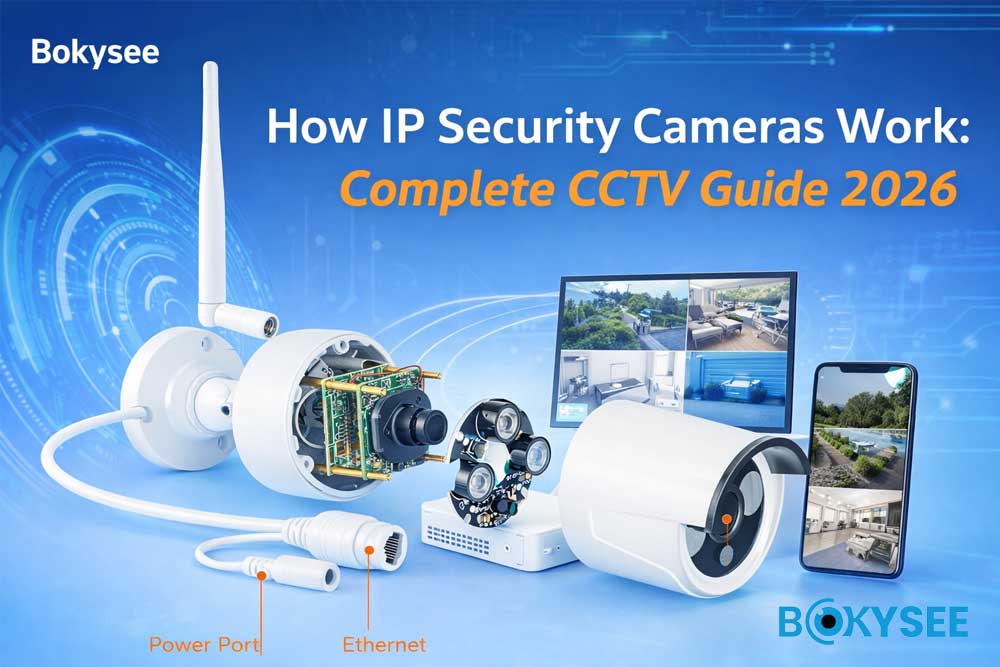
An IP camera is a self-contained digital surveillance system that captures, processes, compresses, and transmits video over a network.
👉 Core workflow:
Lens → Sensor → ISP → SoC → Encoding → Network → Storage
👉 Core hardware:
-
CMOS Sensor (imaging)
-
Processor / SoC (processing & encoding)
-
RAM / Flash (memory)
-
Network interface (Ethernet / WiFi / 4G)
-
PoE (power + data transmission)
👉 In short:
IP Camera = Optics + Processing + Encoding + Network + Storage
What Is an IP Camera? (IP Camera vs Analog CCTV Explained)
An IP camera (Internet Protocol camera) is a digital security camera that captures video, processes it internally, and transmits it over a network (Ethernet, WiFi, or 4G).
Unlike traditional CCTV cameras, IP cameras do not require a DVR to process video, because they have built-in processors and encoding capabilities.
IP Camera = Digital + Network-Based + Smart Processing
What Is an IP Camera?
An IP camera is a self-contained surveillance device that includes:
-
Lens (captures light)
-
Image sensor (converts light to signal)
-
Processor / SoC (compresses video)
-
Network module (transmits data)
👉 This means each camera can:
-
Encode video (H.264 / H.265)
-
Send data directly to an NVR, cloud, or mobile app
-
Support AI features like human detection
IP Camera vs Analog CCTV (Key Differences Explained)
|
Feature |
IP Camera |
Analog CCTV Camera |
|---|---|---|
|
Signal Type |
Digital |
Analog |
|
Video Quality |
HD / 4K / 8MP |
Limited (usually ≤1080P) |
|
Cabling |
Ethernet (PoE supported) |
Coaxial cable |
|
Processing |
Built-in (SoC) |
External (DVR required) |
|
AI Features |
Yes (human/vehicle detection) |
No |
|
Remote Access |
Easy (App / Cloud) |
Limited |
|
Scalability |
High (network-based) |
Limited |
IP Camera Hardware Architecture Explained (Core Components & System Design)
An IP camera is a complete digital security system in one device.
It combines a lens, image sensor, processor, memory, and network module to capture, process, compress, and transmit video over a network.
Core Hardware Components (Inside the Camera)
1. Image Sensor (CMOS vs CCD – Imaging Core)
The image sensor converts light into electrical signals.
👉 Industry standard: CMOS sensor
CMOS vs CCD
|
Feature |
CMOS |
CCD |
|---|---|---|
|
Power |
Low |
High |
|
Speed |
Fast |
Slower |
|
Cost |
Lower |
Higher |
👉 Popular sensors:
-
Sony IMX series
-
SmartSens SC series
Sensor size matters more than megapixels for low-light performance
2. Lens (Focal Length vs Field of View)
The lens focuses light onto the sensor.
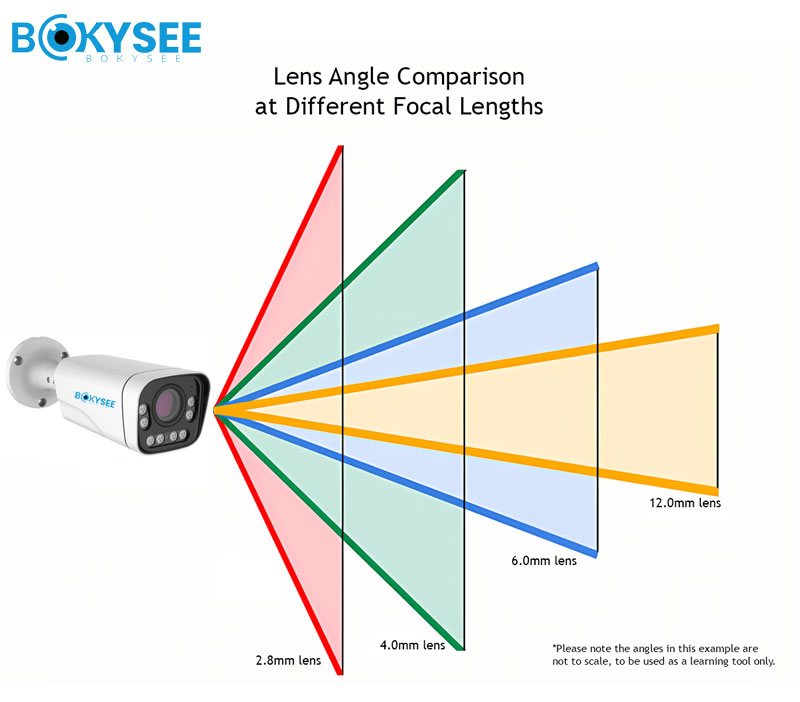
👉 Key factors:
-
2.8mm → wide angle
-
4mm → standard
-
6mm+ → long distance
⚠️ Important:
A high-resolution sensor with a poor lens still produces blurry images
3. Processor / SoC (CPU vs SoC Architecture)
The processor is the brain of the IP camera.
👉 Modern cameras use SoC (System-on-Chip)
CPU vs SoC
|
Type |
Description |
|---|---|
|
CPU |
Basic processing |
|
SoC |
CPU + ISP + Encoder + AI |
👉 Functions:
-
Video encoding (H.264 / H.265)
-
AI detection
-
Network communication
4. Memory System (RAM vs Flash Storage)
|
Type |
Function |
|---|---|
|
RAM |
Temporary processing |
|
Flash |
Firmware & OS |
👉 Flash ensures:
-
System stability
-
Firmware upgrades
-
Reliable boot
5. Network Interface (Ethernet vs WiFi vs 4G)
|
Type |
Use Case |
|---|---|
|
Ethernet (PoE) |
Projects |
|
WiFi |
Indoor |
|
4G LTE |
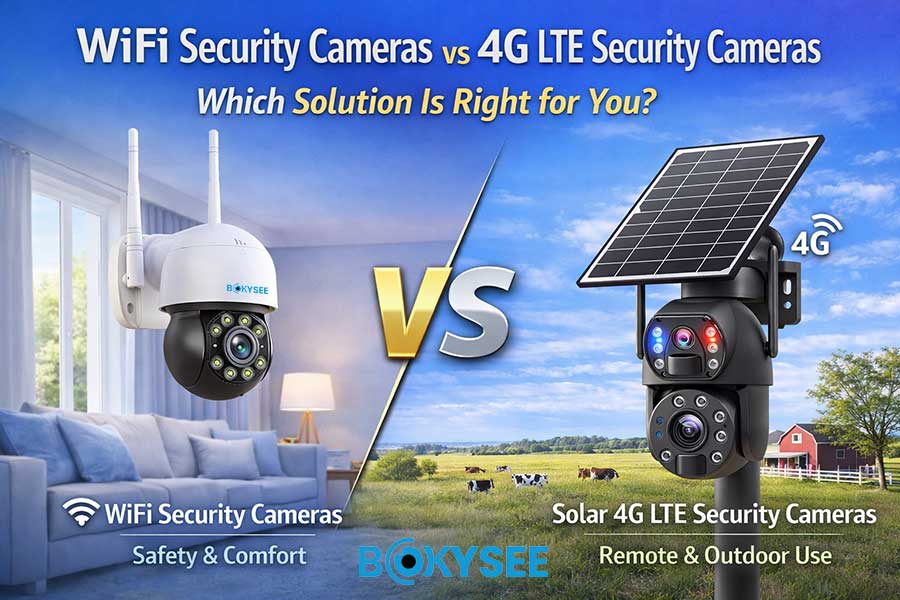
Remote |
👉 Enables real-time video transmission.
Functional Components (How Features Are Enabled)
6. Infrared LEDs (IR vs White Light vs Dual Light)
|
Type |
Feature |
|---|---|
|
IR |
Invisible night vision |
|
White LED |
Full color |
|
Dual Light |
Smart switching |
7. Analog-to-Digital Converter (ADC Explained)
The ADC converts:
👉 Analog signal → Digital data (0 & 1)
📌 Critical step:
Without ADC, no digital video exists
8. Audio Codec (Two-Way Audio Explained)
Supports:
-
Audio recording
-
Two-way communication
⚠️ Note:
Two-way audio often depends on app/SDK, not just ONVIF.
9. Internal Storage (Edge Storage vs NVR)
|
Type |
Advantage |
|---|---|
|
SD Card |
Standalone |
|
NVR |
Centralized |
10. PTZ Motor (Fixed vs PTZ Cameras)
PTZ cameras use stepper motors to enable:
-
Pan
-
Tilt
-
Zoom
11. Voltage Regulator (Power Stability)
Ensures stable voltage (e.g., 3.3V via AMS1117)
👉 Prevents:
-
System crashes
-
Hardware damage
Connectivity & System Components (Project-Level Design)
12. Ethernet Port & PoE (PoE vs DC Power)
PoE = Power + Data in one cable
|
Type |
Advantage |
|---|---|
|
PoE |
Easy installation |
|
DC |
Lower cost |
13. I/O Interface & Alarm Relay
Used for:
-
External sensors
-
Alarm triggers
-
Integration with security systems
How IP Cameras Work (From Light to Bitstream)
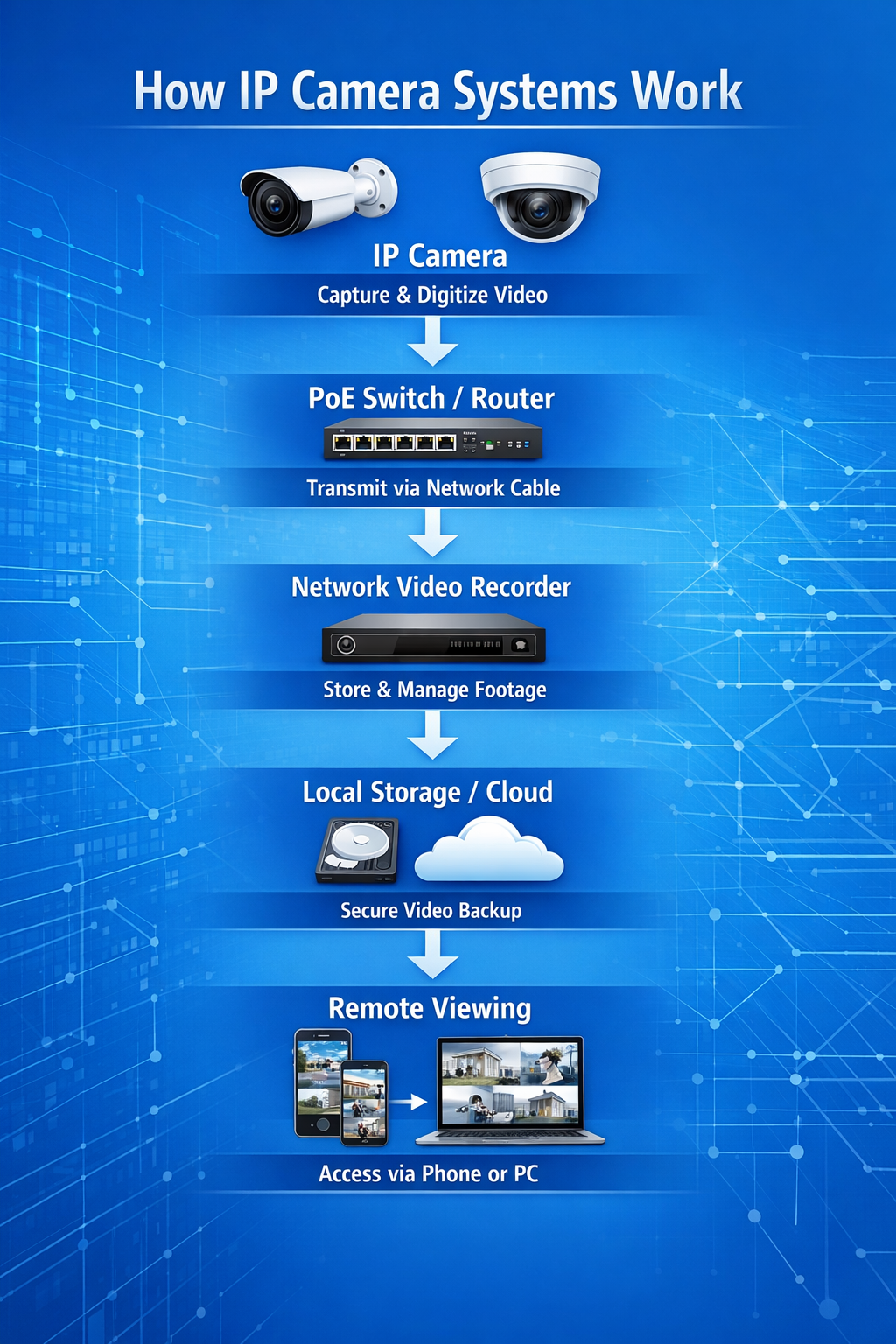
An IP camera works by converting real-world light into a digital video stream that can be viewed and stored over a network. Light first enters through the lens and is captured by the CMOS sensor, which converts it into electrical signals. These signals are then transformed into digital data by an analog-to-digital converter (ADC) and processed by the ISP to improve color, brightness, and clarity. The camera’s processor (SoC) analyzes the image, applies AI detection if needed, and compresses the video using codecs like H.264 or H.265 to reduce file size. Finally, the compressed video—called a bitstream—is transmitted via Ethernet, WiFi, or 4G to an NVR, cloud server, or mobile app, where it can be viewed, recorded, and managed in real time.
Step-by-Step Pipeline
-
Light Capture
Lens → Sensor → RAW signal -
Signal Conversion
ADC converts analog → digital -
Image Processing
ISP processes RAW → image -
AI Detection
Human / vehicle detection -
Video Encoding
H.264 / H.265 compression -
Transmission
RTSP / ONVIF / Cloud -
Storage
SD / NVR / Cloud -
Auto Optimization Loop
AE / AWB / AF adjustments
What Is Bitrate in IP Cameras? (Bitrate vs Resolution vs FPS)
Bitrate in IP cameras refers to the amount of data transmitted per second (measured in Mbps), and it directly determines video quality and storage usage. While resolution controls how detailed the image is and FPS (frames per second) determines how smooth the motion appears, bitrate is what actually carries that visual information—so it must be balanced with both. A higher resolution or higher FPS requires a higher bitrate to maintain clarity; otherwise, the video may look blurry or compressed. In practice, bitrate acts as the “data budget” of a video stream: increasing it improves image quality but also increases bandwidth and storage consumption, making it essential to find the right balance for each surveillance scenario.
Bitrate vs Quality
|
Bitrate |
Result |
|---|---|
|
Low |
Blurry |
|
High |
Clear but larger storage |
Balance Logic
-
Resolution → detail
-
FPS → smoothness
-
Bitrate → data size
Typical Values
-
1080P → ~2 Mbps
-
5MP → 4–8 Mbps
H2: Common Mistakes When Choosing IP Cameras
❌ Higher MP = Better
✅ Lens + sensor matters more
❌ Lower Lux = Better
✅ Depends on conditions
❌ More IR LEDs = Better
✅ May cause overexposure
❌ WDR solves everything
✅ May cause ghosting
Why Understanding IP Camera Hardware Matters
1. Better Product Selection
Choose correct:
-
Lens
-
Sensor
-
Bitrate
2. Avoid Hidden Risks
-
Chip instability
-
Poor power design
3. Improve Project Success
-
Stable system
-
Better performance
4. Stronger Market Position
👉 Sell solutions, not specs
Why Bokysee IP Cameras Are Built for Real Projects (Not Just Specs)
At Bokysee, we don’t design cameras based on datasheets alone —
we build products based on real installation environments, real customer feedback, and real project demands.
👉 Because in the real world, what matters is not just specs —
it’s stability, compatibility, and long-term reliability.
Key Advantages (Designed for Installers & Distributors)
✅ Stable SoC (No Random Chipset Changes)
We ensure consistent chipset supply to avoid compatibility issues and performance differences between batches — critical for long-term projects and OEM partners.
✅ Optimized Lens + Sensor Matching
Instead of chasing high megapixels, we focus on balanced imaging performance, ensuring:
-
Clear day & night image
-
Better low-light results
-
Reduced blur and noise
✅ True H.265 Compression (Real Bandwidth Saving)
Not just “labeling H.265” — we optimize encoding to:
-
Reduce bandwidth by 30–50%
-
Save storage costs
-
Maintain image clarity
✅ Smart Dual Light Technology
Our cameras intelligently switch between:
-
IR night vision (low power)
-
Full-color mode (when motion detected)
👉 Result:
Better visibility + energy efficiency + reduced light pollution
✅ AI Human & Vehicle Detection
Reduce false alarms and improve security efficiency:
-
Human detection
-
Vehicle detection
-
Smart alerts
👉 Ideal for real projects, not just demo environments
✅ ONVIF Compatibility (Easy Integration)
Our systems support ONVIF protocols, making integration easier with:
-
Third-party NVRs
-
Existing surveillance systems
🏭 OEM / ODM Support (Built for Your Brand Growth)
We support partners from trial stage to large-scale distribution:
-
Logo customization (low MOQ options)
-
Firmware & UI branding
-
Custom packaging design
-
Flexible production & fast lead time
👉 We help you build your own brand, not just resell products
See Also
Emerging IP Camera Innovations Shaping 2025 Surveillance Solutions
Ultimate Guide to 4K Security Camera Systems in 2025
Choosing Between Analog And IP Security Cameras Effectively





 English
  Spanish
  Russian