
Quick Summary:
|
Question |
Answer |
|---|---|
|
What is bitrate in CCTV? |
Bitrate is the amount of video data a camera transmits per second. Higher bitrate = better quality but more bandwidth & storage. |
|
Why reduce bitrate? |
To avoid lag, save storage, and prevent NVR overload while keeping clear evidence. |
|
Best way to reduce bitrate? |
Use H.265 encoding, optimize resolution, lower FPS, enable sub-stream, and activate smart compression. |
|
How much can you save? |
Typically 30%–70% bandwidth & storage reduction without affecting key details. |
|
Biggest mistake? |
Reducing bitrate too much and losing facial or license plate clarity. |
What Is CCTV Camera Bitrate and Why It Matters
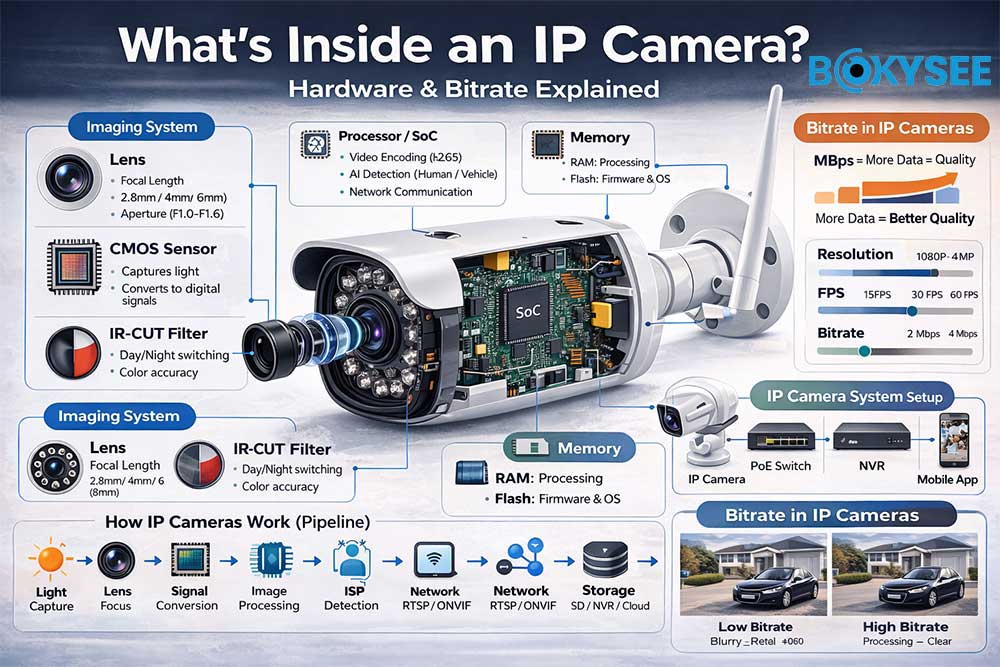
Bit rate (or video bitrate) refers to the amount of data a CCTV camera processes and transmits per second, usually measured in Kbps or Mbps.
In simple terms:
Bitrate determines how much video data is used to represent each second of footage.
How Bitrate Works in Security Cameras
In a surveillance system, bitrate directly affects:
-
Video quality (clarity, detail, sharpness)
-
Bandwidth usage (network load)
-
Storage consumption (recording duration)
👉 Higher bitrate = better image quality, but more storage and bandwidth required
👉 Lower bitrate = less storage usage, but possible loss of detail
What is a Good Bitrate for CCTV Cameras?
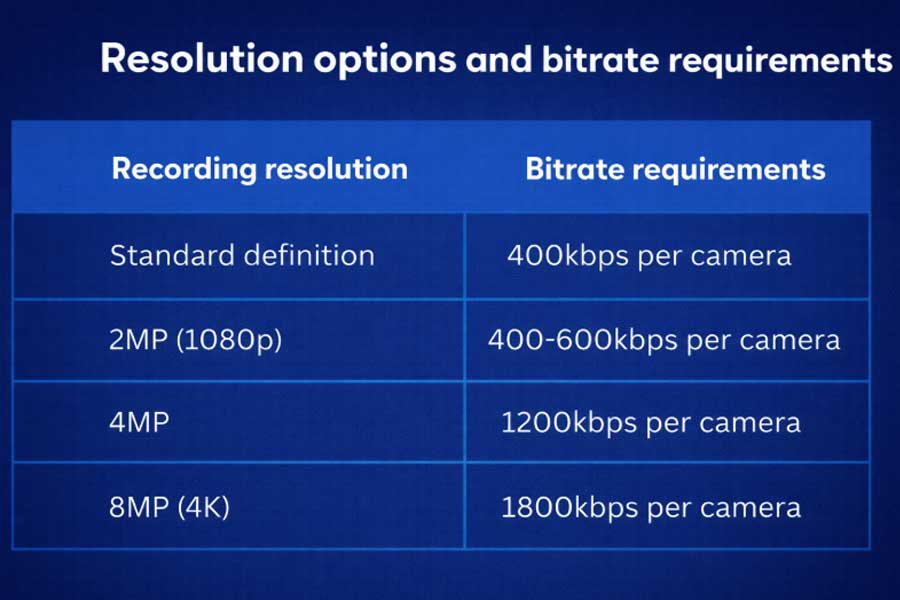
For most standard applications:
-
1080P camera (H.265) → around 2 Mbps is ideal
-
720P camera → around 1 Mbps
-
4K camera → typically 4–8 Mbps
This provides a good balance between video quality and system efficiency.
Benefits of Optimizing CCTV Bitrate, Resolution, and Frame Rate
A well-balanced configuration of bitrate, resolution, and FPS is critical for any professional surveillance system.
1. Improved Video Quality for Identification
Optimized bitrate ensures:
-
Clear facial recognition
-
Visible license plates
-
Better forensic evidence
👉 Especially important for entrances, retail, and high-security areas
2. More Accurate Monitoring and Decision-Making
Balanced video settings allow:
-
Smooth playback
-
Clear motion tracking
-
Better situational awareness
👉 This makes it easier for operators to analyze events from different angles.
3. Efficient Storage Usage (Longer Recording Time)
With proper bitrate control:
-
Less unnecessary data is stored
-
Hard drives last longer
-
Recording duration is extended
👉 Example:
Reducing bitrate by 50% = doubling storage duration
4. Reduced Bandwidth Consumption
Lower bitrate helps:
-
Prevent network congestion
-
Improve remote viewing performance
-
Avoid NVR overload issues
👉 Especially important for multi-camera systems and remote access.
5. Better System Stability and Cost Efficiency
Optimized bitrate means:
-
Fewer system crashes or lag
-
Lower infrastructure costs
-
Better scalability for large projects
When Should You Reduce Camera Bitrate?
Based on our project experience, you should optimize bitrate if you see:
1. Live View Lag or Buffering
-
Remote viewing keeps loading
-
Multi-screen preview becomes slow
👉 Usually caused by bandwidth overload
2. Storage Runs Out Too Fast
-
HDD fills up earlier than expected
👉 Bitrate too high = large video files
3. NVR Alerts (Overload)
-
“Resource insufficient”
-
“Bandwidth exceeded”
👉 Total system bitrate exceeds NVR capacity
4. Night Bitrate Is Higher Than Day
-
Even with less movement
👉 Noise increases data size at night
Step-by-Step Guide to Reduce CCTV Bitrate (Professional Setup Without Changing Hardware)
This is the most important part for installers and distributors:
👉 You do NOT need to replace cameras or NVRs
👉 You only need to optimize key parameters
The goal is simple:
Reduce bitrate while keeping clear, usable video for evidence.
Step 1: Upgrade to H.265 / H.265+ Encoding (Up to 50% Saving)
What is a Video Codec?
A codec is the algorithm that compresses video before storage or transmission. It directly determines how much bandwidth and storage your system consumes.
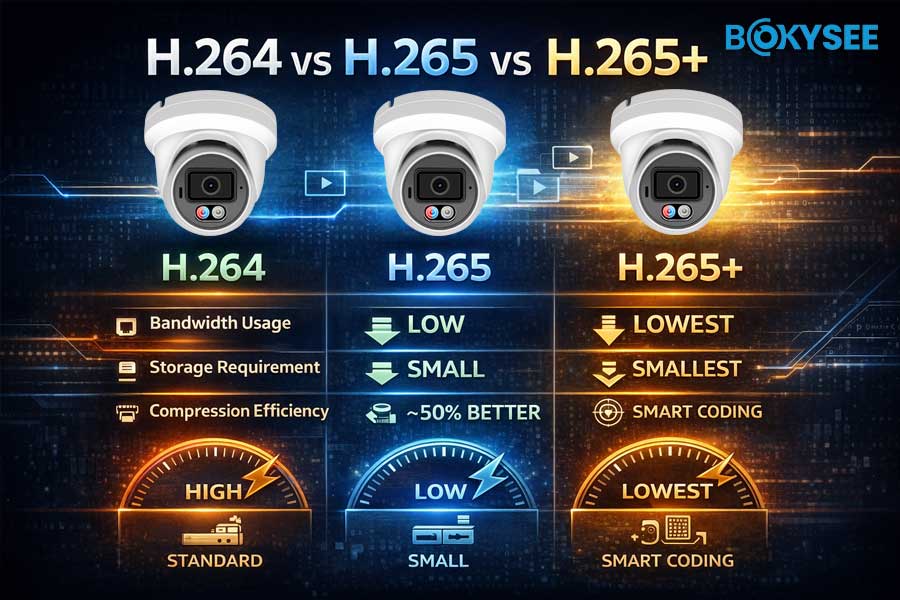
H.264 vs H.265 vs H.265+
|
Encoding |
Efficiency |
Practical Impact |
|---|---|---|
|
H.264 |
Standard |
Higher bandwidth & storage |
|
H.265 (HEVC) |
~50% better |
Same quality, half bitrate |
|
H.265+ / Smart Codec |
Advanced |
Further dynamic optimization |
Why H.265 Is Critical
H.265 improves compression through:
-
Advanced motion prediction
-
Flexible block processing (larger coding units)
-
More efficient data encoding
👉 Result:
✔ Same image quality
✔ Up to 50% bitrate reduction
What is H.265+ (Smart Codec)?
Smart codecs go further by:
-
Detecting moving objects (people, vehicles)
-
Reducing bitrate in static areas
👉 Example:
-
Empty scene → very low bitrate
-
Movement detected → bitrate increases
👉 This is called dynamic bitrate allocation
Action (Practical Setup)
-
Go to camera or NVR settings
-
Change encoding from H.264 → H.265
-
Enable Smart H.265 / H.265+ if available
⚠️ Tip:
Disconnect live preview before switching to avoid encoding errors.
Step 2: Optimize Resolution & Bitrate (Avoid Over-Configuration)
Key Insight
👉 Higher resolution ≠ better system performance
👉 Over-spec = wasted bandwidth
Recommended Settings
|
Scenario |
Resolution |
Bitrate |
|---|---|---|
|
Entrance / Cash Area |
1080P |
2 Mbps |
|
Corridor / Warehouse |
720P |
1 Mbps |
|
Open Area / Fence |
D1 |
512 Kbps |
Bitrate Mode: CBR vs VBR
|
Mode |
특징 |
Recommendation |
|---|---|---|
|
CBR |
Fixed bitrate |
Stable but inefficient |
|
VBR |
Adaptive bitrate |
More efficient |
👉 Recommendation:
-
Use VBR for most CCTV systems
-
Use CBR only for strict bandwidth environments
Step 3: Adjust Frame Rate (FPS) — Save 30–40% Bitrate
What is FPS?
FPS (Frames Per Second) defines how many images are recorded per second.
👉 More FPS = more data = higher bitrate
FPS vs Bitrate Relationship
|
FPS |
Use Case |
Impact |
|---|---|---|
|
30 FPS |
Traffic / fast motion |
Very high bitrate |
|
15 FPS |
Standard CCTV |
Balanced |
|
10 FPS |
Low activity |
Low bitrate |
Professional Recommendation
👉 15 FPS is optimal for most surveillance systems
Why?
-
Smooth enough for monitoring
-
Clear for identification
-
Saves significant bandwidth
Recommended Setup
-
Normal scenes → 15 FPS
-
Low activity → 10–15 FPS
-
High-speed scenes → 25–30 FPS
Step 4: Use Dual Stream (Most Practical Optimization)
Most modern IP cameras support:
👉 Main Stream + Sub Stream
How It Works
|
Stream |
Purpose |
|---|---|
|
Main Stream |
High-quality recording |
|
Sub Stream |
Remote viewing |
Setup Recommendation
-
Main stream → High resolution & bitrate
-
Sub stream → 720P / D1 + ~512 Kbps
-
Set remote preview to sub-stream
Result
✔ Smooth remote viewing
✔ Reduced bandwidth load
✔ No impact on recording quality
👉 This is one of the most effective real-world optimizations
Step 5: Enable Smart Compression (AI-Based Optimization)
Modern cameras support intelligent bitrate control.
Key Technologies
-
Smart H.265 / Smart Encoding
-
Dynamic I-frame adjustment
-
Region of Interest (ROI)
How It Works
Instead of encoding everything equally:
-
Important areas → high bitrate
-
Background → low bitrate
Practical Impact
✔ Reduces unnecessary data
✔ Maintains critical details
✔ Improves storage efficiency
👉 In real projects:
-
H.264 → ~4 Mbps
-
H.265 → ~2 Mbps
-
H.265+ → ~1.2–1.5 Mbps
✔ Up to 60–70% bitrate reduction
Final Takeaway (Installer-Level Summary)
For most CCTV projects, the optimal setup is:
👉 H.265 + 15 FPS + VBR + Smart Codec + Dual Stream
This combination allows you to:
✔ Reduce bandwidth by 30%–70%
✔ Extend storage duration
✔ Maintain clear video for evidence
✔ Improve system stability
Common Mistakes That Make Bitrate Worse
Avoid these typical errors:
❌ 1. Lowering Bitrate Too Much
-
Example: 1080P at 512 Kbps
👉 Cannot recognize faces or plates
❌ 2. Disabling Sub Stream
-
Remote devices pull main stream
👉 Causes lag immediately
❌ 3. Ignoring Night Settings
-
Noise increases bitrate at night
✅ Solution:
-
Enable noise reduction
-
Slightly limit night bitrate
Quick Optimization Checklist (3-Step Setup)
If you want a fast solution:
-
Enable H.265 encoding
-
Set:
-
1080P → 2 Mbps
-
FPS → 15
-
-
Enable:
-
Dual stream
-
Smart compression
-
👉 Test 1–2 cameras first, then apply to all
Why Optimized Bitrate Matters for Projects & Distributors
For B2B buyers (installers, distributors, project contractors):
Optimized bitrate means:
-
Lower bandwidth cost
-
Longer storage time
-
More stable systems
-
Fewer customer complaints
This is especially critical for:
-
Large CCTV projects
-
Remote monitoring systems
-
Wireless / 4G / Solar cameras
Recommended Products from BOKYSEE
If you are planning new projects or upgrades:
At Bokysee, we focus on:
-
H.265 / Smart Encoding cameras
-
AI-powered bitrate optimization
-
Stable NVR systems for multi-channel projects
-
OEM / ODM customization
👉 In our testing, properly configured systems can reduce:
✔ 30%–70% storage usage
✔ Significant bandwidth pressure
We support:
-
Distributors
-
CCTV installers
-
Project contractors
👉 Contact us for project pricing or OEM solutions
FAQ: CCTV Bitrate Optimization
Q1: What is a good bitrate for a 1080P CCTV camera?
A typical recommendation is around 2 Mbps when using H.265 compression.
This provides:
-
Clear image quality for identification (faces, objects)
-
Efficient use of storage and bandwidth
👉 If using H.264, you may need 3–4 Mbps to achieve similar quality.
Q2: Does lowering FPS reduce video quality?
Not significantly for most surveillance scenarios.
-
15 FPS is already smooth enough for monitoring and evidence
-
Lowering from 30 FPS to 15 FPS can reduce bitrate by 30–40%
👉 Only high-speed scenes (traffic, license plates) require higher FPS.
Q3: Why is CCTV bitrate higher at night?
At night, cameras produce more image noise due to low light conditions.
This increases bitrate because:
-
Noise adds unnecessary pixel changes
-
Compression becomes less efficient
👉 Solution:
-
Enable noise reduction (DNR)
-
Use smart codec / H.265+
-
Improve lighting when possible
Q4: Is H.265 always better than H.264?
In most cases, yes.
H.265 offers:
-
Up to 50% lower bitrate
-
Better compression efficiency
-
Longer storage duration
⚠️ However:
-
Ensure your NVR and devices support H.265 before switching
Q5: Can I reduce CCTV bitrate without changing hardware?
Yes — and this is the most common approach.
Most bitrate optimization comes from:
-
Switching to H.265 / Smart Codec
-
Adjusting FPS and resolution
-
Using VBR instead of CBR
-
Enabling dual stream and smart encoding
👉 With proper settings, you can reduce bitrate by 30%–70% without upgrading equipment.
See Also
Understanding Full Color IP Cameras And Their Key Advantages
Emerging IP Camera Innovations In 2025 For Better Security
Essential Guide To Purchasing 4G Security Cameras
Guide To Encoding Settings For Bokysee IP Cameras
Key Differences Between IP Camera Systems And Traditional Models






 English
  Spanish
  Russian